
Wiring & connectivity guidelines
Note
The insulation class of the cables must be suitable for the intended signal voltage. Ensure that the cables used comply with the appropriate safety and operational standards for the specific voltage levels in the system.
Ethernet
The following guidelines apply:
- Cable type: You must use CAT5e or higher cables for optimal performance. In commercial and industrial settings, it is recommended to use shielded cables.
- Network connection: Check with your computer if you have internet on the ethernet cable before connecting it to the SmartgridOne Controller or device.
- Maximum distance: The individual cable length is limited to 100 meters. For longer distances you need a signal booster or switch.
- Subnet: The SmartgridOne Controller and the devices have to be on the same subnet to be able to communicate (e.g. a SmartgridOne Controller in subnet 192.168.1.x can generally not talk with a device in subnet 192.168.200.x).
- Outbound ports: See network configuration on firewall configurations.
Note
Powerline adapters
For places in residential settings that have no ethernet cabling installed, you may consider Powerline adapters. Please note that only wall sockets that are on the same phase can be used with most powerline adapters.
Other interfaces
Tip
Additional I/O's
All SmartgridOne models are extendible with additionaly I/O's through the accessories. See accessories for more information.
SmartgridOne Pro (Model OM1)
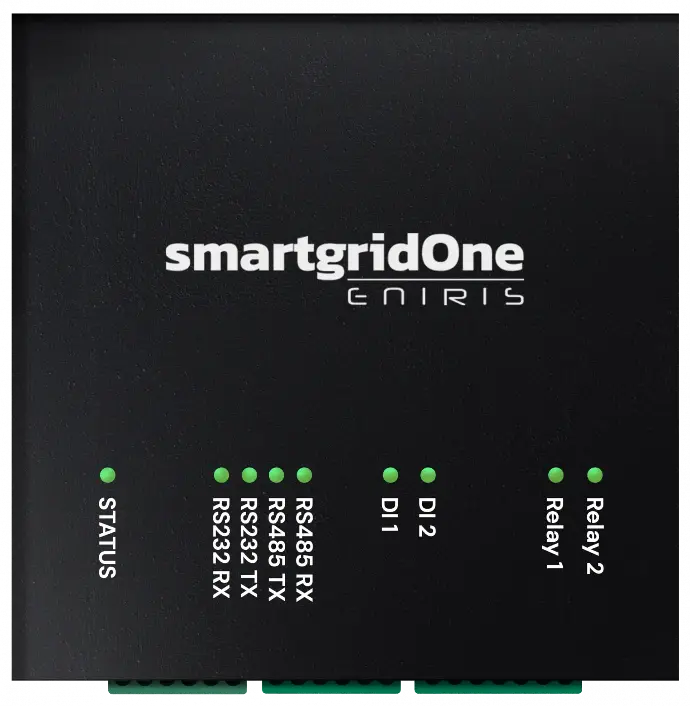

The permissible wire cross-section for the connectors is as follows:
| Type | Section (AWG) | Section (mm²) |
|---|---|---|
| Solid Wires | 26-16 AWG | 0,129-1,31 |
| Stranded (Flexible) Wires | 26-16 AWG | 0,129-1,31 |
Digital inputs & relay outputs
Warning
You MUST respect the voltage & current ratings from the Specifications. Using the device outside of its rated values is dangerous and may lead to damage and injuries.
| Interface | Voltage (V) | Current (A) |
|---|---|---|
| Relay | Max. 30Vac / 50Vdc | 1.0 A |
| Digital input | 5-50Vdc | N/A |
Tip
If you need the switch higher voltages or currents than what the relay is rated for, then use the relay of the SmartgridOne Controller to switch another relay that has the voltage or current rating that you need.
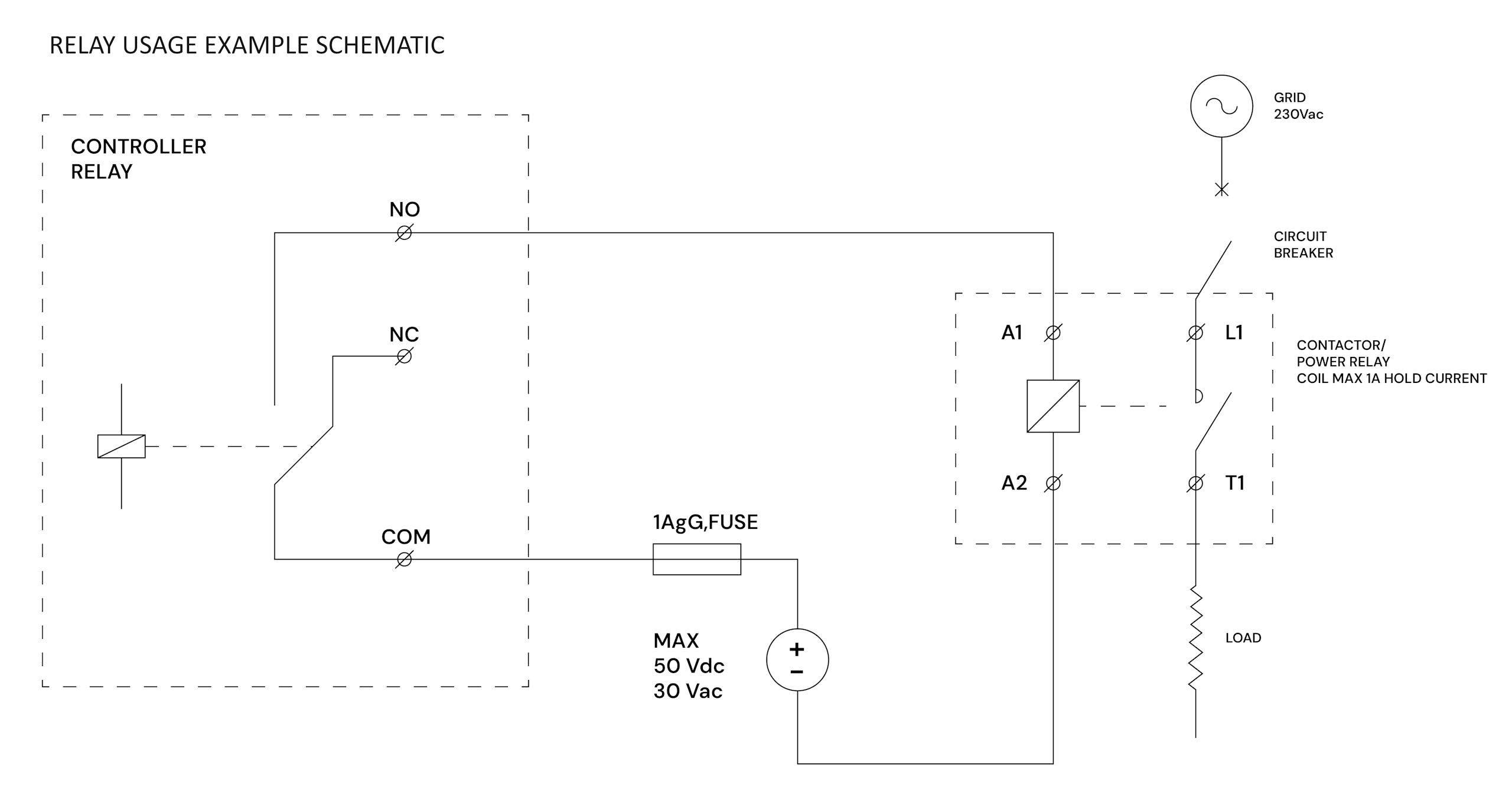
The following guidelines apply:
- Cable type: It is recommended to use shielded cables with twisted pairs for optimal performance.
Wiring S0 Pulse Meters
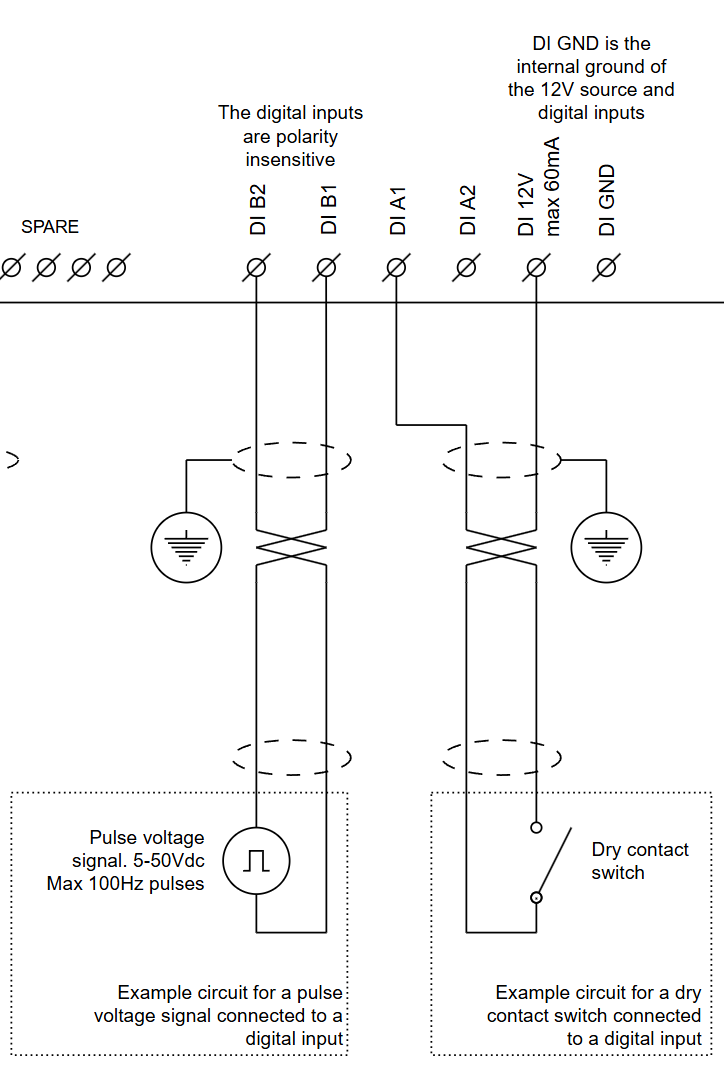
Scenario 1 (left example): Active Meter (Voltage Output) Use this wiring if the meter generates its own voltage pulse.
Scenario 2 (right example): Passive Meter (Dry Contact) Use this wiring if the meter acts as a relay/switch. The controller provides the wetting voltage (12V).
RS485
Wiring
Tip
The color of the wires does not matter. You may choose this, as long as both the A and B are from a single twisted pair.
The following guidelines apply:
- Cable type:
- You must use shielded cables with twisted pairs for optimal performance.
- Use a single pair for a RS485 connection. One cable of this pair is used for RS485-A and the other one for RS485-AB. Do not split A and B over different pairs). If there is a ground wire, use another pair for the ground wire.
- For short distances, a twisted pair from a network cable (minimum CAT5e) can be used.
- Avoid using SVV cables or alarm cables, as they are not suitable for these purposes.
- The cable must have a characteristic impedance of 100 to 120 ohm.
Signal Mapping
Different manufacturers use different naming conventions (A/B, +/-, D1/D0). Use this table to match your device's signals to the SmartgridOne controller.
RS485 Wiring
- For correct RS485 wiring: Follow the guidelines for RS485 wiring.
- If the wiring shown in the table below is incorrect, please let us know.
- There is no general consensus in the industry about the usage of A and B for the RS485 polarity, so it may be counterintuitive and opposite of what you might expect for some devices.
| Device | SmartgridOne Controller model OM1 | SmartgridOne Controller model IG8 | RS485-USB converter | RS485-Ethernet converter |
|---|---|---|---|---|
| RS485 A | RS485_POS | RS485 A | TX+ | |
| RS485 B | RS485_NEG | RS485 B | TX- | |
| RS GND | GND | Not available | G |
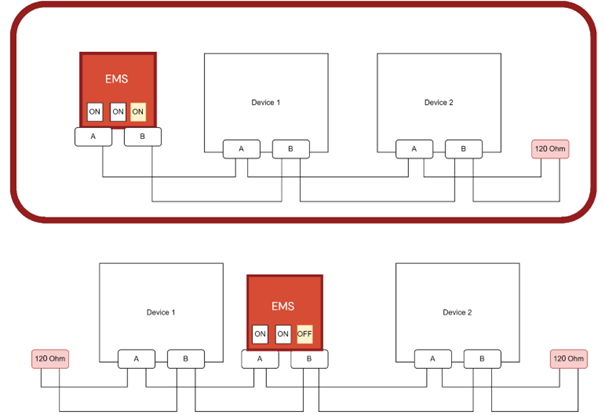
- Connecting multiple devices: The cable must be daisy-chained from device to device. Place the SmartgridOne Controller like the picture below.
- Maximum number of devices: The absolute maximum number of devices that the SmartgridOne Controller supports on the same RS485 bus is 20 (provided that each device has 1/4th unit load on the RS485 bus, which almost all devices do).
- Maximum distance: The total cable length is limited to 1000 meters - but it is recommended to limit the maximum to 100m.
- Long Distances:
- SmartgridOne Controller model OM1: It is recommended to activate the termination resistor on the SmartgridOne Controller (already active by default from the factory), and install a 120Ω termination resistor at the opposite end of the daisy chain.
- Other SmartgridOne Controller models: Install a 120Ω termination resistor at the both ends of the daisy chain.
- Grounding the cable shield: If the cable is shielded, then you must connect the shield to the electrical earth of the installation at one end of the cable.
Tip
In case of many devices
- If you have many devices on the RS485 bus, the control system gets slower. This is because over an RS485 bus only one device can communicate at a time.
- For this reason we recommend connecting no more than 5 devices on the same RS485 bus.
- If you have more devices, it is recommended to use one of the RS485 expansion accessories.
Warning
Grounding shielded cables
- Ground the shield at a single end of the cable only. Do not ground the shield at multiple points along the cable, not even the other end of the cable. If you use a daisy chain, then ground each individual cable at a single end (you may use the shield of another cable as the grounding point at the end of the cable, but this is not recommended).
- Ground the shield to the earth ground of the electrical installation. Do not ground it to the signal ground.
Termination resistor & bias resistors
To the left of the I/O connections on the SmartgridOne Controller, there are three DIP switches for terminating and biasing the RS485 communication bus.
The correct configuration depends on the topology of the RS485 bus. In most cases, activating all resistors is the recommended choice. Do this if you are unsure. This is different if the SmartgridOne Controller is not at the end of the communication bus or if another device has active bias resistors.
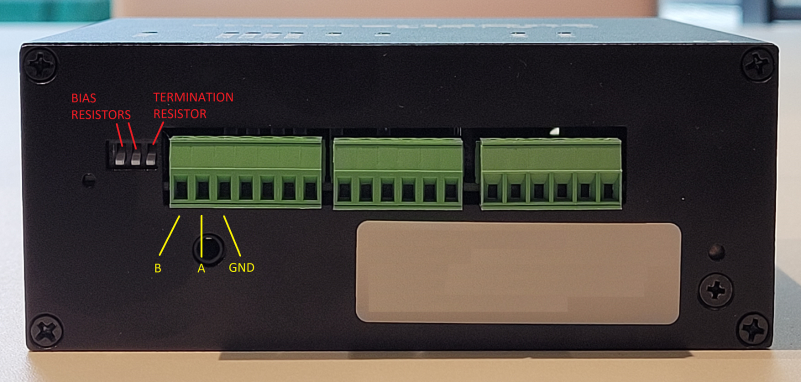
Whether the resistors are active or not depends on the position of the DIP switches. To do this, you need to consider the production date of the SmartgridOne Controller. You can deduce this from the serial number. The serial number starts with production code OM1, followed by six digits representing the production date. E.g. OM1240315 was produced on 15/03/2024.
If your is manufactured before 1 August 2024: (These devices have white switches coming from a black component).
- The termination resistor is active when the corresponding DIP switch is in the down position.
- The bias resistors are active when the corresponding DIP switches are in the down position.
If your is manufactured after 1 August 2024: (These devices have white switches coming from a red component).
- The termination resistor is active when the corresponding DIP switch is in the up position.
- The bias resistors are active when the corresponding DIP switches are in the up position.
Addresses
Warning
You MUST give each device on the RS485 bus a unique address.
Tip
Use lower addresses first (1, 2, ...), because the SmartgridOne Controller will find them faster!
Tip
Stick with the factory default baud rate, parity and stop bits. The SmartgridOne Controller will scan on those first.
SmartgridOne Home (Model EDS)
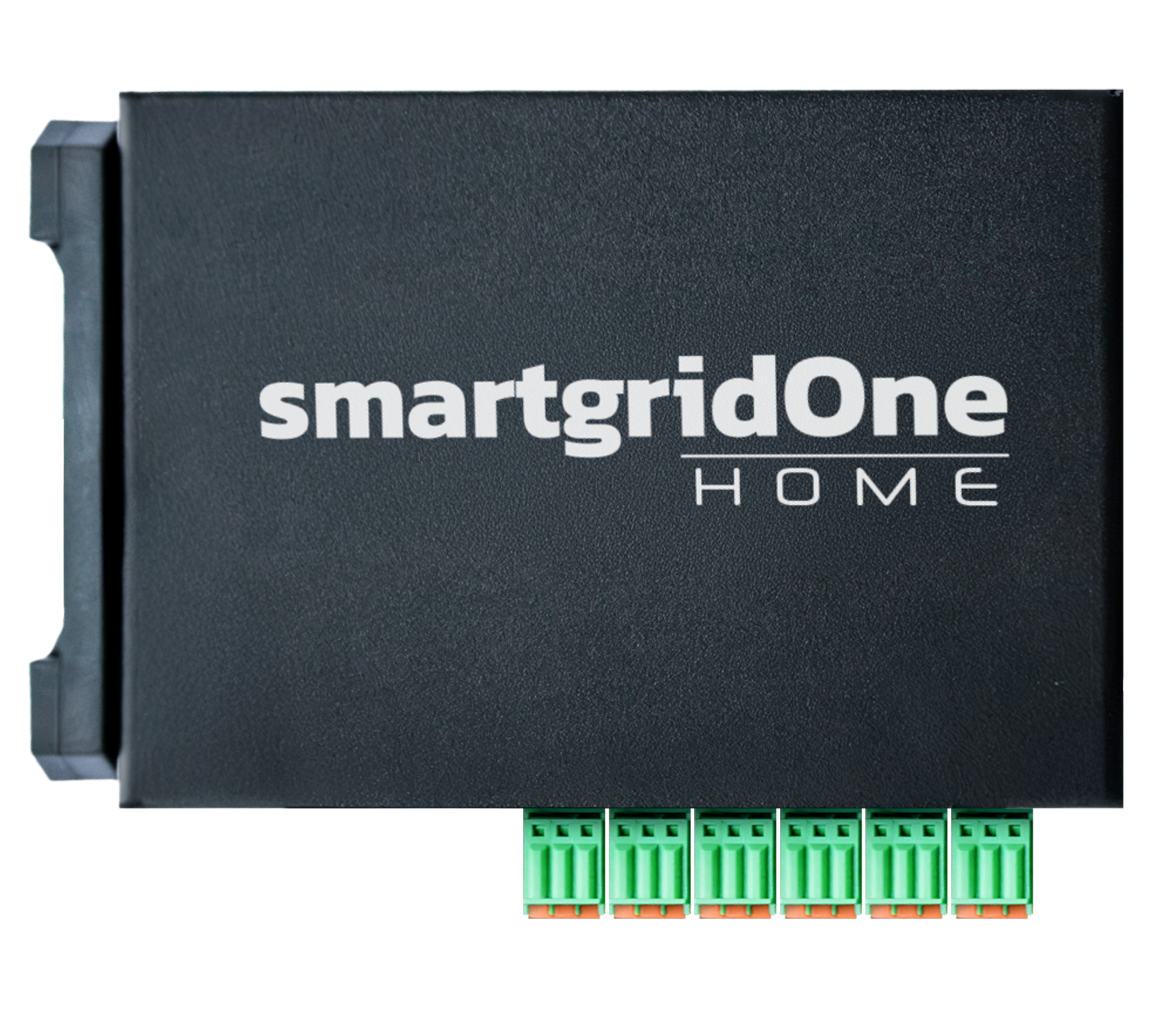
The permissible wire cross-section for the connectors is as follows:
| Type | Section (AWG) | Section (mm²) |
|---|---|---|
| Solid Wires | 26-18 AWG | 0,129-1 |
| Stranded (Flexible) Wires | 26-18 AWG | 0,129-1 |
RS485
Wiring
Tip
The color of the wires does not matter. You may choose this, as long as both the A and B are from a single twisted pair.
The following guidelines apply:
- Cable type:
- You must use shielded cables with twisted pairs for optimal performance.
- Use a single pair for the RS485 A and B wires (do not split them over different pairs). If there is a ground wire, use another pair for the ground wire.
- For short distances, a twisted pair from a network cable (minimum CAT5e) can be used.
- Avoid using SVV cables or alarm cables, as they are not suitable for these purposes.
- The cable must have a characteristic impedance of 100 to 120 ohm.
Signal Mapping
Different manufacturers use different naming conventions (A/B, +/-, D1/D0). Use this table to match your device's signals to the SmartgridOne controller.
RS485 Wiring
- For correct RS485 wiring: Follow the guidelines for RS485 wiring.
- If the wiring shown in the table below is incorrect, please let us know.
- There is no general consensus in the industry about the usage of A and B for the RS485 polarity, so it may be counterintuitive and opposite of what you might expect for some devices.
| Device | SmartgridOne Controller model OM1 | SmartgridOne Controller model IG8 | RS485-USB converter | RS485-Ethernet converter |
|---|---|---|---|---|
| RS485 A | RS485_POS | RS485 A | TX+ | |
| RS485 B | RS485_NEG | RS485 B | TX- | |
| RS GND | GND | Not available | G |
- Connecting multiple devices: The cable must be daisy-chained from device to device. Place the SmartgridOne Controller like the picture below.
- Maximum number of devices: The absolute maximum number of devices that the SmartgridOne Controller supports on the same RS485 bus is 20 (provided that each device has 1/4th unit load on the RS485 bus, which almost all devices do).
- Maximum distance: The total cable length is limited to 1000 meters - but it is recommended to limit the maximum to 100m.
- Long Distances: Install a 120Ω termination resistor at the both ends of the daisy chain.
- Grounding the cable shield: If the cable is shielded, then you must connect the shield to the electrical earth of the installation at one end of the cable.
Tip
TIP: In case of many devices
- If you have many devices on the RS485 bus, the control system gets slower. This is because over an RS485 bus only one device can communicate at a time.
- For this reason we recommend connecting no more than 5 devices on the same RS485 bus.
- If you have more devices, it is recommended to use multiple RS485 ports.
Warning
Grounding shielded cables
- Ground the shield at a single end of the cable only. Do not ground the shield at multiple points along the cable, not even the other end of the cable. If you use a daisy chain, then ground each individual cable at a single end (you may use the shield of another cable as the grounding point at the end of the cable, but this is not recommended).
- Ground the shield to the earth ground of the electrical installation. Do not ground it to the signal ground.
Warning
Multiple ports Do not connect the same RS485 bus to multiple ports on the SmartgridOne. This will introduce interference.
Termination resistors
You must install 120 ohm termination resistors on both ends of the serial communication bus. The SmartgridOne does not have an integrated termination resistor.
Addresses
Warning
You MUST give each device on the RS485 bus a unique address.
Tip
Use lower addresses first (1, 2, ...), because the SmartgridOne Controller will find them faster!
Tip
Stick with the factory default baud rate, parity and stop bits. The SmartgridOne Controller will scan on those first.