
Liczniki energii BMR

Obsługiwane urządzenia
| Device Type | Modbus TCP (Ethernet) | RS485 |
|---|---|---|
| PLA33 | ✅ | ✅ |
| PLA33RX |
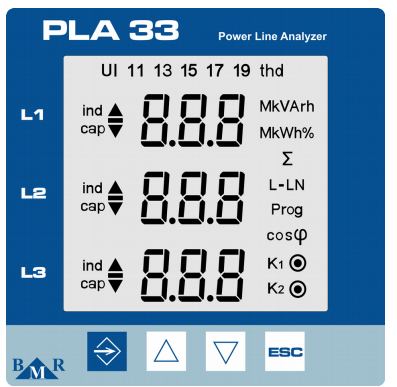
Rysunek 1: Panel przedni PLA33 pokazujący przyciski takie jak SET, klawisze kursora oraz ESC.
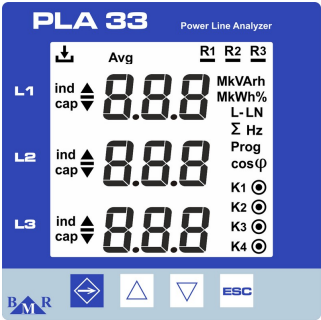
Rysunek 2: Panel przedni PLA33RX pokazujący przyciski takie jak ESC, klawisze kursora oraz diody LED statusu dla rejestracji i wyjść przekaźnikowych.
Okablowanie
RS485
W przypadku okablowania RS485 należy postępować zgodnie z wytycznymi dotyczącymi okablowania RS485.
Informacja
RS485 Wiring
- For correct RS485 wiring: Follow the guidelines for RS485 wiring.
- If the wiring shown in the table below is incorrect, please let us know.
- There is no general consensus in the industry about the usage of A and B for the RS485 polarity, so it may be counterintuitive and opposite of what you might expect for some devices.
| Device | SmartgridOne Controller model OM1 | SmartgridOne Controller model IG8 | RS485-USB converter | RS485-Ethernet converter |
|---|---|---|---|---|
| A | RS485 A | RS485_POS | RS485 A | TX+ |
| B | RS485 B | RS485_NEG | RS485 B | TX- |
| GND | RS GND | GND | Not available | G |
Ostrzeżenie
NOTE: RS485 Device Addresses
- You MUST give each device on the RS485 bus a unique address. Check the manual of the device on how to do this.
- Use lower addresses first (1, 2, ...) because the SmartgridOne Controller will find them faster!
- For each device, it is generally recommended to stick with the factory default baud rate, parity, and stop bits. The SmartgridOne Controller will scan on those first.
Ethernet
W przypadku okablowania Ethernet należy postępować zgodnie z wytycznymi dotyczącymi okablowania Ethernet.
Konfiguracja
Konfiguracja RS485
Aby skonfigurować komunikację RS485 w licznikach energii BMR, wykonaj następujące kroki:
-
Ustaw adres Modbus:
- Wejdź do menu ustawień, przytrzymując przycisk SET przez 5 sekund.
- Za pomocą klawiszy kursora przejdź do menu komunikacji (
P_2). - Ustaw Id (unikalny adres Modbus) z zakresu od 1 do 247.
-
Ustaw prędkość transmisji (baud rate):
- W menu komunikacji (
P_2) ustaw bd (prędkość transmisji), aby pasowała do Twojego systemu. Obsługiwane prędkości transmisji obejmują9.6 / 19.2 / 38.4 / 57.6 / 115 kBd.
- W menu komunikacji (
-
Parzystość i bity stopu:
- Skonfiguruj PAr (parzystość) jako
None,Odd, lubEven. - Ustaw St (bity stopu) na
1lub2zgodnie z potrzebami.
- Skonfiguruj PAr (parzystość) jako
-
Zakończenie RS485:
- Jeśli licznik jest ostatnim urządzeniem w magistrali RS485, dodaj rezystor zakończeniowy 120 Ω.
Ostrzeżenie
NOTE: RS485 Device Addresses
- You MUST give each device on the RS485 bus a unique address. Check the manual of the device on how to do this.
- Use lower addresses first (1, 2, ...) because the SmartgridOne Controller will find them faster!
- For each device, it is generally recommended to stick with the factory default baud rate, parity, and stop bits. The SmartgridOne Controller will scan on those first.
Konfiguracja Ethernet (tylko PLA33RX)
Dla urządzeń z możliwością Ethernet:
- Upewnij się, że kabel Ethernet jest prawidłowo podłączony.
- Skonfiguruj adres IP, maskę podsieci oraz bramę za pomocą oprogramowania Power Monitoring Software (PMS).
- Sprawdź, czy port Modbus TCP jest ustawiony na 502.
Last updated December 11, 2025Edit this page