

Dyness Omvormers
Belangrijk
Belangrijk
Momenteel ondersteunt de integratie een laadstatuslimiet tot 95%. Dit komt omdat wanneer de laadstatus boven de 95% komt, de batterij kan stoppen met het opvolgen van setpoints vanwege acties van het batterijbeheersysteem. We werken samen met Dyness en andere partners aan een oplossing voor dit probleem.
Ondersteunde Apparaten
| Device Type | Variants | Modbus TCP (Ethernet) | RS485 | Curtailment |
|---|---|---|---|---|
| EC100 | 100kWh | ✅ | ✅ | ✅ |
| DH100F | 71~100kWh | |||
| DH200F | 100kW/215kWh | |||
| DH200Y | 100kW/232kWh | |||
| LS | ❌ | |||
| HT-A | ✅ |
Bekabeling
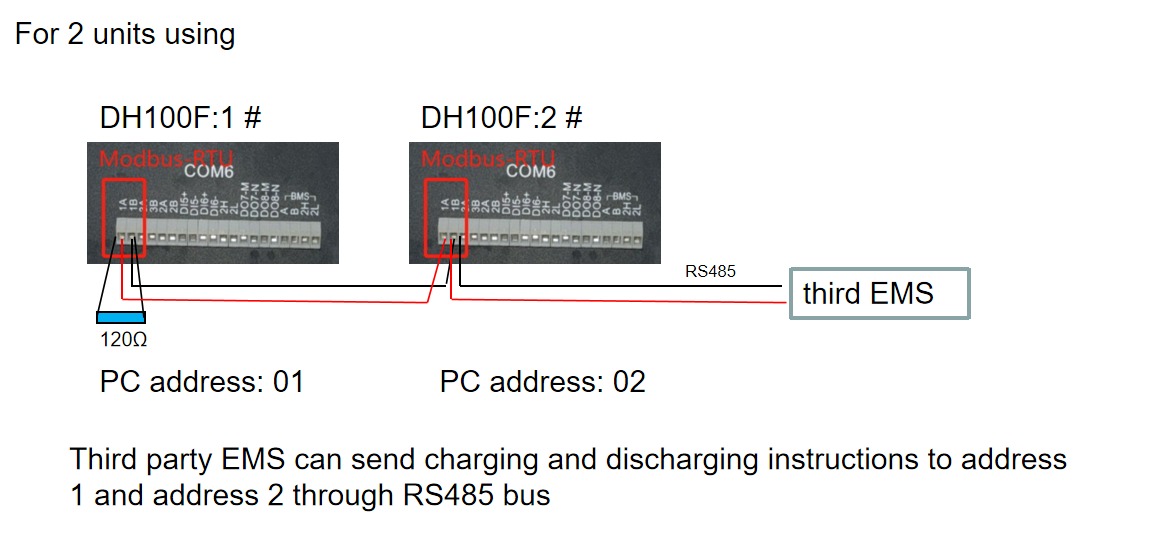
De SmartgridOne Controller en de Dyness omvormers communiceren via RS485 of Ethernet.
Ethernet
Voor correcte ethernetbekabeling: Volg de richtlijnen voor ethernetbekabeling.
RS485
Info
RS485 Wiring
- For correct RS485 wiring: Follow the guidelines for RS485 wiring.
- If the wiring shown in the table below is incorrect, please let us know.
- There is no general consensus in the industry about the usage of A and B for the RS485 polarity, so it may be counterintuitive and opposite of what you might expect for some devices.
| Device | SmartgridOne Controller model OM1 | SmartgridOne Controller model IG8 | RS485-USB converter | RS485-Ethernet converter |
|---|---|---|---|---|
| COM6 terminal 1A | RS485 A | RS485_POS | RS485 A | TX+ |
| Com6 terminal 1B | RS485 B | RS485_NEG | RS485 B | TX- |
| N/A | RS GND | GND | Not available | G |
Configuratie
DH100F
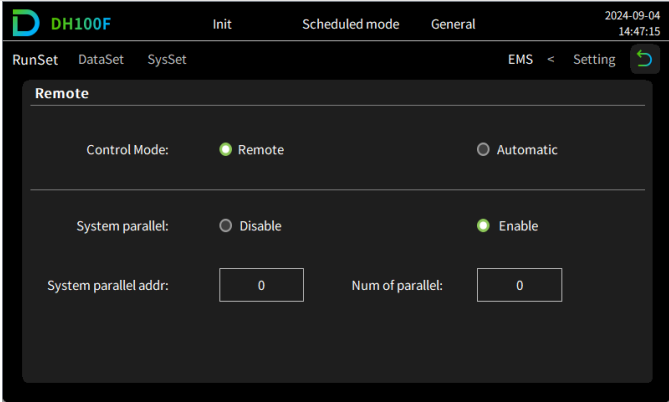
De Dyness DH100F moet worden ingesteld op remote modus:
- Klik op het hoofdmenu-icoon rechtsboven in de hoofdinterface
- Klik op "Data" in de hoofdmenubalk
- Klik op "EMS" in de submenu balk
- Klik op "RunSet" linksboven in de navigatiebalk
- Stel de besturingsmodus in op "Remote"
Waarschuwing
NOTE: RS485 Device Addresses
- You MUST give each device on the RS485 bus a unique address. Check the manual of the device on how to do this.
- Use lower addresses first (1, 2, ...) because the SmartgridOne Controller will find them faster!
- For each device, it is generally recommended to stick with the factory default baud rate, parity, and stop bits. The SmartgridOne Controller will scan on those first.
Last updated July 17, 2026Edit this page