
عدادات الطاقة Inepro

الأجهزة المدعومة
| Device Type | Modbus TCP (Ethernet) | RS485 |
|---|---|---|
| Inepro PRO380 | ❌ | ✅ |
التوصيل
RS485
معلومات
RS485 Wiring
- For correct RS485 wiring: Follow the guidelines for RS485 wiring.
- If the wiring shown in the table below is incorrect, please let us know.
- There is no general consensus in the industry about the usage of A and B for the RS485 polarity, so it may be counterintuitive and opposite of what you might expect for some devices.
| Device | SmartgridOne Controller model OM1 | SmartgridOne Controller model IG8 | RS485-USB converter | RS485-Ethernet converter |
|---|---|---|---|---|
| A (pin 22) | RS485 A | RS485_POS | RS485 A | TX+ |
| B (pin 23) | RS485 B | RS485_NEG | RS485 B | TX- |
| N/A | RS GND | GND | Not available | G |
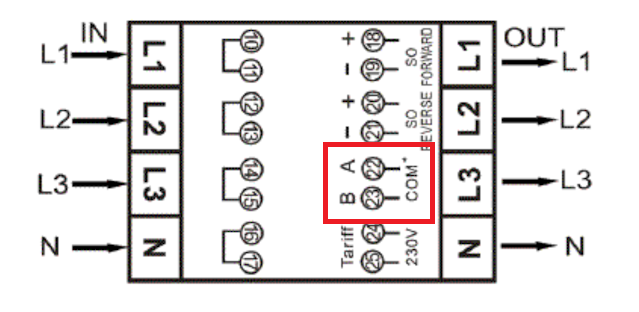
التكوين
تحذير
NOTE: RS485 Device Addresses
- You MUST give each device on the RS485 bus a unique address. Check the manual of the device on how to do this.
- Use lower addresses first (1, 2, ...) because the SmartgridOne Controller will find them faster!
- For each device, it is generally recommended to stick with the factory default baud rate, parity, and stop bits. The SmartgridOne Controller will scan on those first.
راجع دليل العداد للحصول على مزيد من المعلومات التفصيلية حول تغيير عنوان Modbus. بشكل افتراضي، يُعيَّن العداد على العنوان 1. ويمكن تغيير ذلك عبر شاشة العداد.
- استخدم الأزرار للانتقال إلى وضع البرنامج 2.
- اضغط مع الاستمرار على الزر الأيمن لمدة 3 ثوانٍ لفتح القائمة.
- انتقل إلى صفحة LCD Modbus/M-bus ID (addr xxx).
- اضغط مع الاستمرار على الزر الأيمن لمدة 5 ثوانٍ للدخول إلى وضع البرمجة.
- تبدأ القيمة بالوميض: حدّد 3 أرقام (Modbus: 001-247). أكّد كل رقم بالضغط باستمرار على الزرين معًا لمدة 3 ثوانٍ.
- تعرض شاشة LCD كلمة OK عند تأكيد الإعداد.

Last updated December 10, 2025Edit this page