SmartgridOne logo
SmartgridOne logo
Quick StartInstallationNetworkWiring & connectivity guidelinesApp
1. Link to your account2. Accessing commissioning interface3. Grid limits4. Location / address5. Add grid energy meter6. Add other devices7. Grouping devices
9. PV panel configuration10. External control signals
SpecificationsStatus LEDsControl response timeVideo tutorialsCertificatesLicenseSafety, maintenance and legal notices
Configuration from A to Z

Link the SmartgridOne Controller to your account

  1. Log in to the app (smartphone) or SmartgridOne App (computer).

  2. Set the view to 'SmartgridOne'.

Image 1
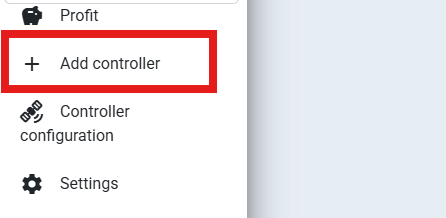
  1. Click on 'Add controller'.
Image 1
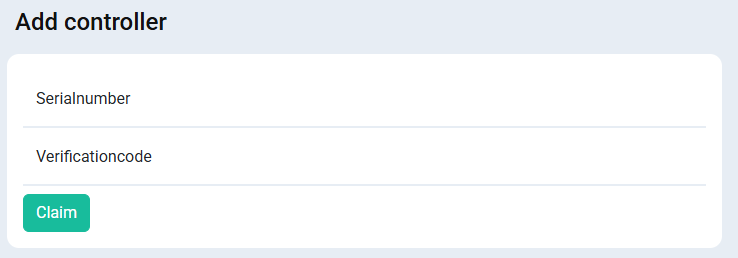
  1. Fill in the serial number and verification code. You can find these on the label of the SmartgridOne Controller. Click 'Claim'.
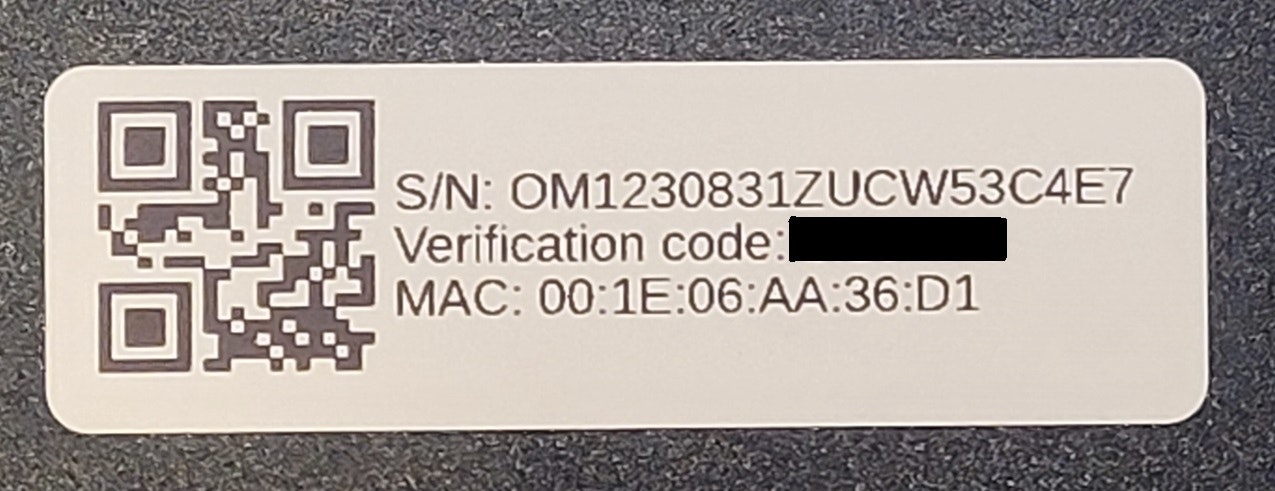
Image 1
Image 1
  1. The SmartgridOne Controller is now linked to your account! You can now access the commissioning interface from the portal, or give access to the end user.

App

Previous Page

2. Accessing commissioning interface

Next Page

On this page

Link the SmartgridOne Controller to your account