
Contatori di energia BMR

Dispositivi supportati
| Device Type | Modbus TCP (Ethernet) | RS485 |
|---|---|---|
| PLA33 | ✅ | ✅ |
| PLA33RX |
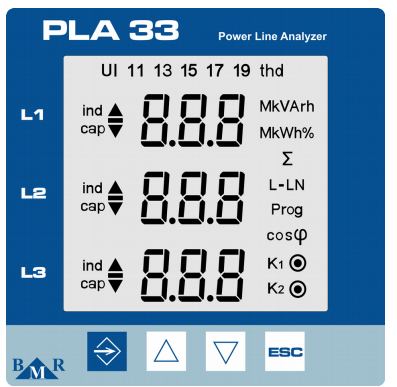
Figura 1: Pannello frontale del PLA33 con pulsanti come SET, i tasti cursore ed ESC.
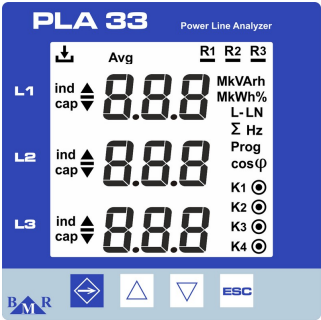
Figura 2: Pannello frontale del PLA33RX con pulsanti come ESC, i tasti cursore e LED di stato per la registrazione e le uscite relè.
Cablaggio
RS485
Per il cablaggio RS485, seguire le linee guida per il cablaggio RS485.
Info
RS485 Wiring
- For correct RS485 wiring: Follow the guidelines for RS485 wiring.
- If the wiring shown in the table below is incorrect, please let us know.
- There is no general consensus in the industry about the usage of A and B for the RS485 polarity, so it may be counterintuitive and opposite of what you might expect for some devices.
| Device | SmartgridOne Controller model OM1 | SmartgridOne Controller model IG8 | RS485-USB converter | RS485-Ethernet converter |
|---|---|---|---|---|
| A | RS485 A | RS485_POS | RS485 A | TX+ |
| B | RS485 B | RS485_NEG | RS485 B | TX- |
| GND | RS GND | GND | Not available | G |
Avviso
NOTE: RS485 Device Addresses
- You MUST give each device on the RS485 bus a unique address. Check the manual of the device on how to do this.
- Use lower addresses first (1, 2, ...) because the SmartgridOne Controller will find them faster!
- For each device, it is generally recommended to stick with the factory default baud rate, parity, and stop bits. The SmartgridOne Controller will scan on those first.
Ethernet
Per il cablaggio Ethernet, seguire le linee guida per il cablaggio Ethernet.
Configurazione
Configurazione RS485
Per configurare la comunicazione RS485 sui contatori di energia BMR, seguire questi passaggi:
-
Impostare l'indirizzo Modbus:
- Accedere al menu delle impostazioni tenendo premuto il pulsante SET per 5 secondi.
- Accedere al menu di comunicazione (
P_2) utilizzando i tasti cursore. - Impostare l'Id (indirizzo Modbus univoco) tra 1 e 247.
-
Impostare la baud rate:
- Nel menu di comunicazione (
P_2), configurare la bd (baud rate) in modo che corrisponda al sistema. Le baud rate supportate includono9.6 / 19.2 / 38.4 / 57.6 / 115 kBd.
- Nel menu di comunicazione (
-
Parità e bit di stop:
- Configurare PAr (parità) come
None,OddoppureEven. - Impostare gli St (bit di stop) su
1o2, secondo necessità.
- Configurare PAr (parità) come
-
Terminazione RS485:
- Se il contatore è l'ultimo dispositivo sul bus RS485, aggiungere una resistenza di terminazione da 120 Ω.
Avviso
NOTE: RS485 Device Addresses
- You MUST give each device on the RS485 bus a unique address. Check the manual of the device on how to do this.
- Use lower addresses first (1, 2, ...) because the SmartgridOne Controller will find them faster!
- For each device, it is generally recommended to stick with the factory default baud rate, parity, and stop bits. The SmartgridOne Controller will scan on those first.
Configurazione Ethernet (solo PLA33RX)
Per i dispositivi dotati di funzionalità Ethernet:
- Assicurarsi che il cavo Ethernet sia collegato correttamente.
- Utilizzare il Power Monitoring Software (PMS) per configurare l'indirizzo IP, la maschera di sottorete e il gateway.
- Verificare che la porta Modbus TCP sia impostata su 502.
Last updated December 11, 2025Edit this page