

عاكسات Dyness
مهم
مهم
حاليًا، بالنسبة إلى تكامل خزائن C&I المزودة بـ MPPT، تم تحديد الحد الأقصى لـ SOC عند 95% للسماح للطاقة الكهروضوئية بمواصلة تغذية الحمل.
الأجهزة المدعومة
| Device Type | Variants | Modbus TCP (Ethernet) | RS485 | Curtailment |
|---|---|---|---|---|
| DH100F | 71~100kWh | ✅ | ✅ | ✅ |
| DH200F | 100kW/215kWh | |||
| DH200Y | 100kW/232kWh | |||
| LS | ||||
| HT-A | ||||
| DH800Y | ⚠️ this feature has yet to be tested |
التوصيل
تتواصل SmartgridOne Controller وعاكسات Dyness عبر RS485 أو Ethernet.
Ethernet
للتوصيل الصحيح عبر Ethernet: اتبع إرشادات التوصيل عبر Ethernet.
RS485
معلومات
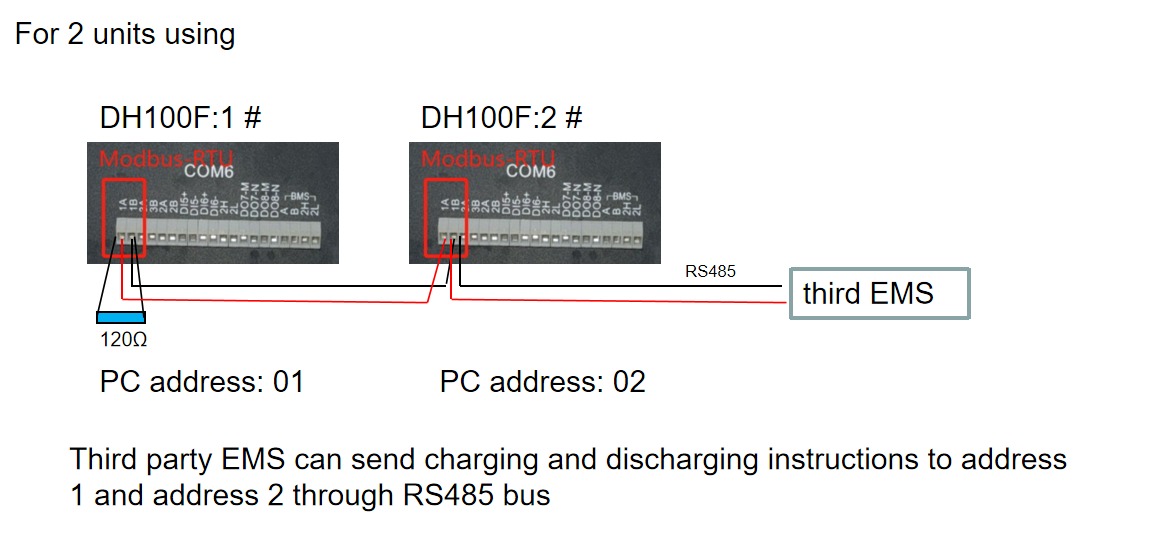
RS485 Wiring
- For correct RS485 wiring: Follow the guidelines for RS485 wiring.
- If the wiring shown in the table below is incorrect, please let us know.
- There is no general consensus in the industry about the usage of A and B for the RS485 polarity, so it may be counterintuitive and opposite of what you might expect for some devices.
| Device | SmartgridOne Controller model OM1 | SmartgridOne Controller model IG8 | RS485-USB converter | RS485-Ethernet converter |
|---|---|---|---|---|
| COM6 terminal 1A | RS485 A | RS485_POS | RS485 A | TX+ |
| Com6 terminal 1B | RS485 B | RS485_NEG | RS485 B | TX- |
| N/A | RS GND | GND | Not available | G |
التكوين
DH100F
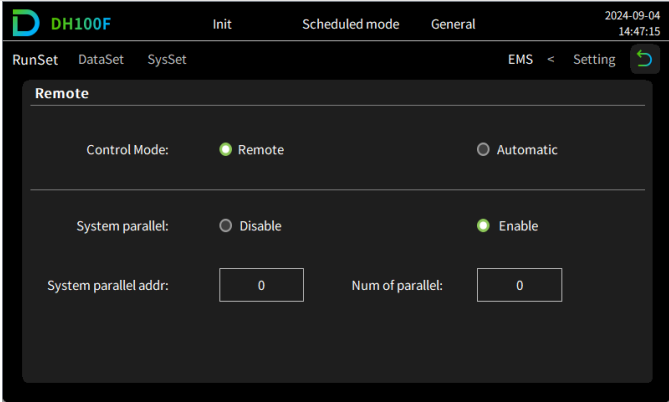
يجب ضبط Dyness DH100F على الوضع البعيد:
- انقر على أيقونة القائمة الرئيسية في الزاوية العلوية اليمنى من الواجهة الرئيسية
- انقر على "Data" في شريط القائمة الرئيسية
- انقر على "EMS" في شريط القائمة الفرعية
- انقر على "RunSet" في الجزء العلوي الأيسر من شريط التنقل
- اضبط وضع التحكم على "Remote"
تحذير
NOTE: RS485 Device Addresses
- You MUST give each device on the RS485 bus a unique address. Check the manual of the device on how to do this.
- Use lower addresses first (1, 2, ...) because the SmartgridOne Controller will find them faster!
- For each device, it is generally recommended to stick with the factory default baud rate, parity, and stop bits. The SmartgridOne Controller will scan on those first.
Last updated August 24, 2026Edit this page