
TODO: يبدو أن هذا ينطبق على المزيد من العاكسات؟

عاكسات Sofar من سلسلتي TL-G3 وTLM/X-G3
الأجهزة المدعومة
| Device Type | Modbus TCP (Ethernet) | RS485 | Curtailment |
|---|---|---|---|
| ... | ✅ | ✅ | ✅ |
| 1100-3300TL-G3 | |||
| 3000-7500TLM | |||
| 10000-40000TL | |||
| 5000-80000TLX-G3 | |||
| 100000-125000TLX-G4 | |||
| 7000-10500TLM-G3 |
تحذير
تحذير
- يمكن لمعظم الأجهزة الاتصال باستخدام Modbus TCP. ولا ينطبق ذلك على سلسلة "SOFAR 1...40KTL"
- تتطلب بعض العاكسات برنامجًا ثابتًا محددًا يقتصر توفره على موزعين معينين. استشر الموزع في حال الشك.
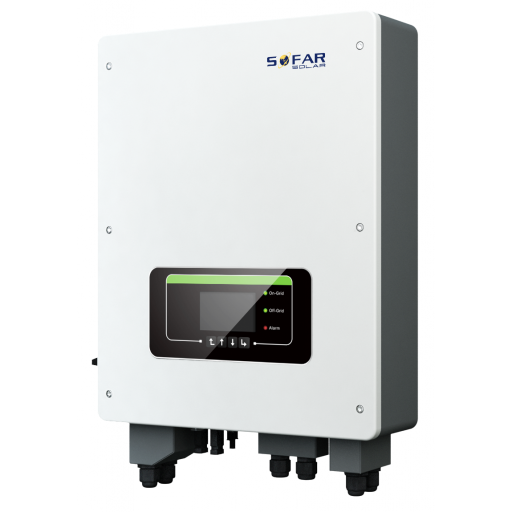
التوصيل
Ethernet
قم بتوصيل العاكس بشبكة الإنترنت لديك باستخدام "SOFAR SOLAR ETHERNET STICK LSE3".
للتوصيل الصحيح عبر Ethernet: اتبع إرشادات التوصيل عبر Ethernet.
RS485
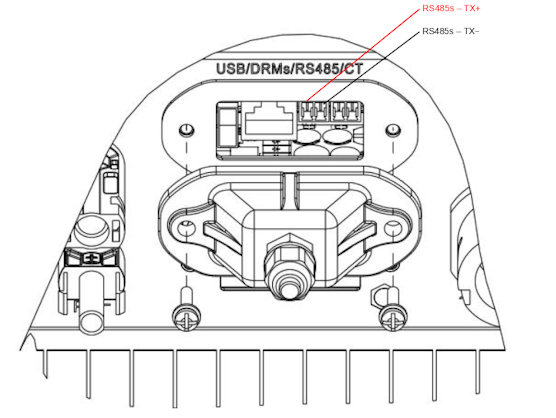
...TL-G3 وG1 وG2
معلومات
RS485 Wiring
- For correct RS485 wiring: Follow the guidelines for RS485 wiring.
- If the wiring shown in the table below is incorrect, please let us know.
- There is no general consensus in the industry about the usage of A and B for the RS485 polarity, so it may be counterintuitive and opposite of what you might expect for some devices.
| Device | SmartgridOne Controller model OM1 | SmartgridOne Controller model IG8 | RS485-USB converter | RS485-Ethernet converter |
|---|---|---|---|---|
| RS485s TR+ | RS485 A | RS485_POS | RS485 A | TX+ |
| RS485s TR- | RS485 B | RS485_NEG | RS485 B | TX- |
| N/A | RS GND | GND | Not available | G |
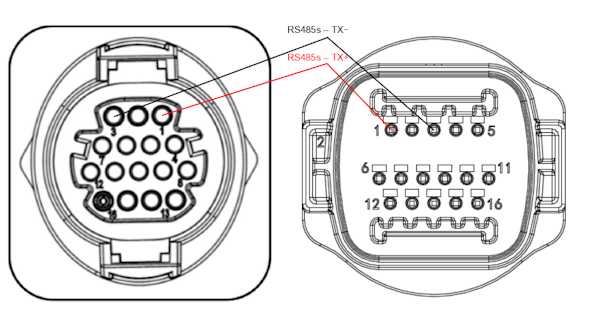
...TLX وTLM
معلومات
RS485 Wiring
- For correct RS485 wiring: Follow the guidelines for RS485 wiring.
- If the wiring shown in the table below is incorrect, please let us know.
- There is no general consensus in the industry about the usage of A and B for the RS485 polarity, so it may be counterintuitive and opposite of what you might expect for some devices.
| Device | SmartgridOne Controller model OM1 | SmartgridOne Controller model IG8 | RS485-USB converter | RS485-Ethernet converter |
|---|---|---|---|---|
| RS485s TR+ (pin 1) | RS485 A | RS485_POS | RS485 A | TX+ |
| RS485s TR- (pin 3) | RS485 B | RS485_NEG | RS485 B | TX- |
| N/A | RS GND | GND | Not available | G |
التكوين
RS485
تحذير
NOTE: RS485 Device Addresses
- You MUST give each device on the RS485 bus a unique address. Check the manual of the device on how to do this.
- Use lower addresses first (1, 2, ...) because the SmartgridOne Controller will find them faster!
- For each device, it is generally recommended to stick with the factory default baud rate, parity, and stop bits. The SmartgridOne Controller will scan on those first.
يجب تفعيل التحكم الخارجي في العاكس من قائمة تكوين العاكس عبر شاشة LCD.
- انقر لفترة وجيزة على الزر السفلي.
- سترى "1. إدخال الإعدادات"، اضغط على الزر السفلي لمدة ثانيتين للدخول إلى الإعدادات.
- تنقّل عبر الإعدادات حتى ترى:
- Modbus Address أو
- Set ComProtocol
- اضغط على الزر السفلي لمدة ثانيتين لتعيين العنوان.
- اضبط العنوان على القيمة المطلوبة.
Last updated August 17, 2026Edit this page