

Inversores Dyness
Importante
Importante
Actualmente, la integración soporta hasta un límite del estado de carga del 95%. Esto se debe a que cuando el estado de carga supera el 95%, la batería puede dejar de responder a los puntos de consigna debido a las acciones del sistema de gestión de la batería. Estamos trabajando para resolver este problema con Dyness y otros socios.
Dispositivos compatibles
| Device Type | Variants | Modbus TCP (Ethernet) | RS485 | Curtailment |
|---|---|---|---|---|
| EC100 | 100kWh | ✅ | ✅ | ✅ |
| DH100F | 71~100kWh | |||
| DH200F | 100kW/215kWh | |||
| DH200Y | 100kW/232kWh | |||
| LS | ||||
| HT-A | ||||
| DH800Y | ⚠️ this feature has yet to be tested |
Cableado
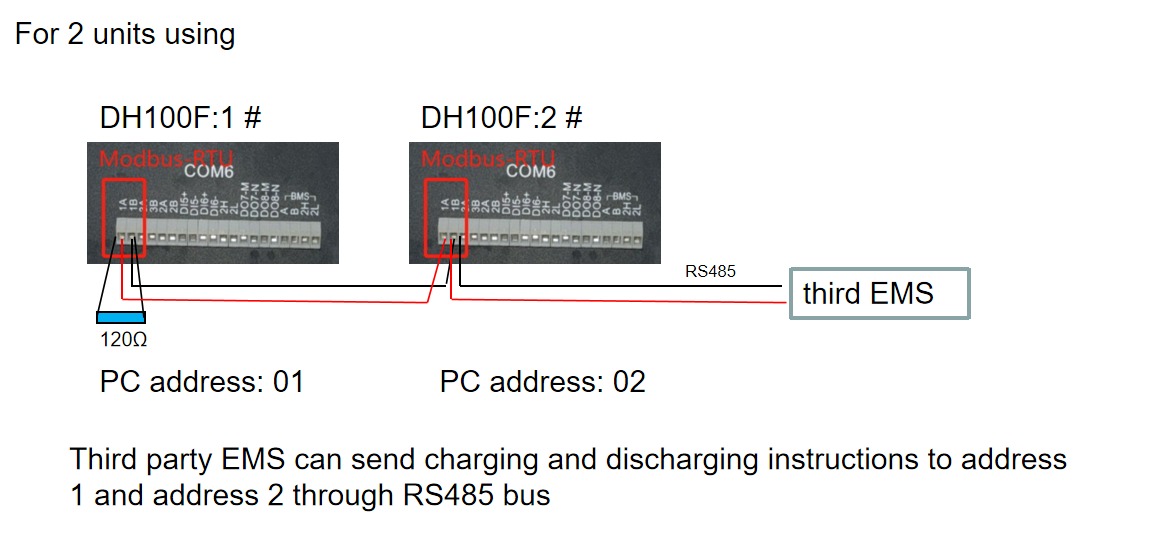
Los inversores SmartgridOne Controller y Dyness se comunican mediante RS485 o Ethernet.
Ethernet
Para un cableado ethernet correcto: Siga las directrices para el cableado ethernet.
RS485
Info
RS485 Wiring
- For correct RS485 wiring: Follow the guidelines for RS485 wiring.
- If the wiring shown in the table below is incorrect, please let us know.
- There is no general consensus in the industry about the usage of A and B for the RS485 polarity, so it may be counterintuitive and opposite of what you might expect for some devices.
| Device | SmartgridOne Controller model OM1 | SmartgridOne Controller model IG8 | RS485-USB converter | RS485-Ethernet converter |
|---|---|---|---|---|
| COM6 terminal 1A | RS485 A | RS485_POS | RS485 A | TX+ |
| Com6 terminal 1B | RS485 B | RS485_NEG | RS485 B | TX- |
| N/A | RS GND | GND | Not available | G |
Configuración
DH100F
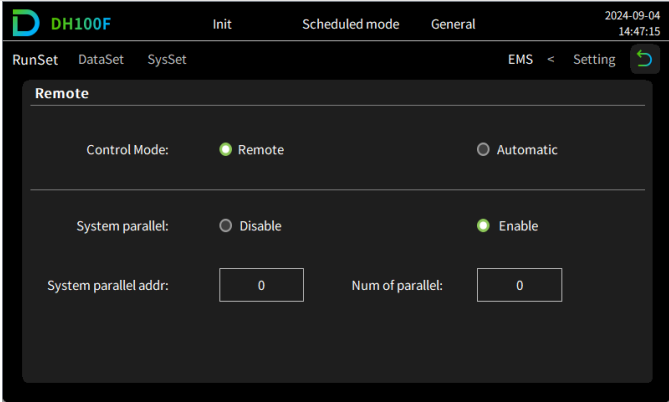
El Dyness DH100F debe configurarse en modo remoto:
- Haga clic en el icono del menú principal en la esquina superior derecha de la interfaz principal
- Haga clic en "Data" en la barra del menú principal
- Haga clic en "EMS" en la barra del submenú
- Haga clic en "RunSet" en la parte superior izquierda de la barra de navegación
- Establezca el modo de control en "Remote"
Advertencia
NOTE: RS485 Device Addresses
- You MUST give each device on the RS485 bus a unique address. Check the manual of the device on how to do this.
- Use lower addresses first (1, 2, ...) because the SmartgridOne Controller will find them faster!
- For each device, it is generally recommended to stick with the factory default baud rate, parity, and stop bits. The SmartgridOne Controller will scan on those first.
Last updated August 13, 2026Edit this page