
Chint Energy Meters

Supported Devices
| Device Type | Variants | Modbus TCP (Ethernet) | RS485 |
|---|---|---|---|
| DDSU666 | 230V-5/80A 230V-100A/40mA | ✅ | ✅ |
| DTSU666 | 3x230V/400V-5/80A 3x230V/400V-1.5(6)A 3x230V/400V-100A/40mA | ||
| DTSU666HW | |||
| DTSU666 for Afore | 3x230V/400V-5/80A | ❌ | |
| DTSU666-20 |
Connection
The communication between the SmartgridOne and the energy meter operates via an RS-485 serial bus or Modbus TCP.
It is recommended to use shielded cables with twisted pairs for optimal performance. For short distances, a twisted pair from a network cable (minimum CAT5e) can be used.
The following guidelines apply:
- Maximum Distance: The total cable length, including the main cable and branches, is limited to 100 meters.
- Connecting Multiple Energy Meters: The cable should be daisy-chained from meter to meter or branched off the main cable (branches must not exceed 1 meter).
- Long Distances: It is recommended to install a 120Ω termination resistor at the end of the main cable and activate the termination resistor on the SmartgridOne Controller.
Info
RS485 Wiring
- For correct RS485 wiring: Follow the guidelines for RS485 wiring.
- If the wiring shown in the table below is incorrect, please let us know.
- There is no general consensus in the industry about the usage of A and B for the RS485 polarity, so it may be counterintuitive and opposite of what you might expect for some devices.
| Device | SmartgridOne Controller model OM1 | SmartgridOne Controller model IG8 | RS485-USB converter | RS485-Ethernet converter |
|---|---|---|---|---|
| Terminal 24 | RS485 A | RS485_POS | RS485 A | TX+ |
| Terminal 25 | RS485 B | RS485_NEG | RS485 B | TX- |
| N/A | RS GND | GND | Not available | G |
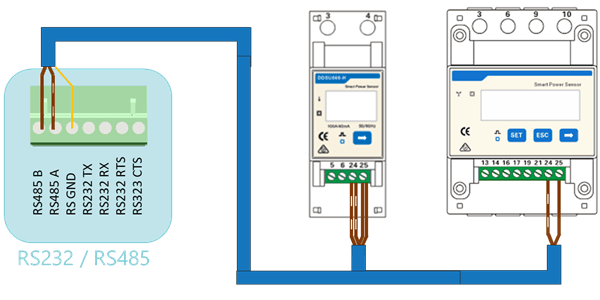
Warning
NOTE: RS485 Device Addresses
- You MUST give each device on the RS485 bus a unique address. Check the manual of the device on how to do this.
- Use lower addresses first (1, 2, ...) because the SmartgridOne Controller will find them faster!
- For each device, it is generally recommended to stick with the factory default baud rate, parity, and stop bits. The SmartgridOne Controller will scan on those first.
Last updated March 26, 2026Edit this page