
TODO: Wygląda na to, że dotyczy to większej liczby falowników?

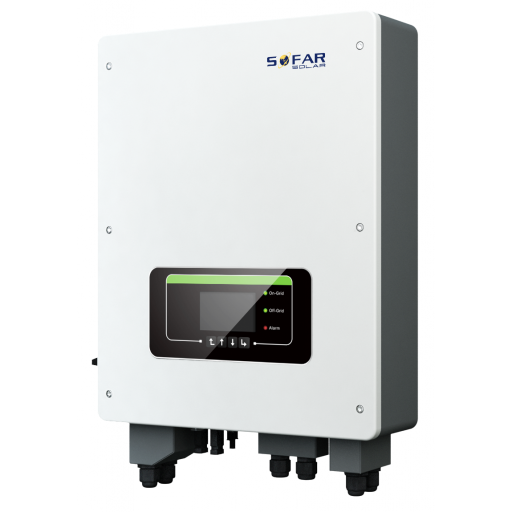
Falowniki serii Sofar TL-G3 i TLM/X-G3
Obsługiwane urządzenia
| Device Type | Modbus TCP (Ethernet) | RS485 | Curtailment |
|---|---|---|---|
| ... | ✅ | ✅ | ✅ |
Ostrzeżenie
Ostrzeżenie
- Większość urządzeń może komunikować się przy użyciu modbus TCP. Nie dotyczy to serii "SOFAR 1...40KTL"
- Niektóre falowniki wymagają specjalnego oprogramowania układowego, które jest ograniczone do określonych dystrybutorów. W razie wątpliwości skonsultuj się z dystrybutorem.
Okablowanie
Ethernet
Podłącz falownik do swojej sieci internetowej przy pomocy "SOFAR SOLAR ETHERNET STICK LSE3".
Dla poprawnego okablowania ethernetowego: Postępuj według wytycznych dotyczących okablowania ethernetowego.
RS485
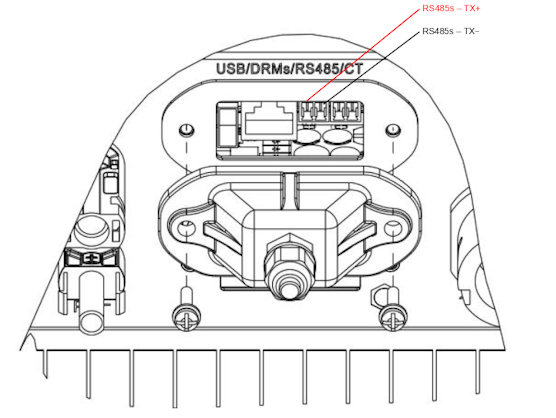
...TL-G3 oraz G1 i G2
Informacja
RS485 Wiring
- For correct RS485 wiring: Follow the guidelines for RS485 wiring.
- If the wiring shown in the table below is incorrect, please let us know.
- There is no general consensus in the industry about the usage of A and B for the RS485 polarity, so it may be counterintuitive and opposite of what you might expect for some devices.
| Device | SmartgridOne Controller model OM1 | SmartgridOne Controller model IG8 | RS485-USB converter | RS485-Ethernet converter |
|---|---|---|---|---|
| RS485s TR+ | RS485 A | RS485_POS | RS485 A | TX+ |
| RS485s TR- | RS485 B | RS485_NEG | RS485 B | TX- |
| N/A | RS GND | GND | Not available | G |
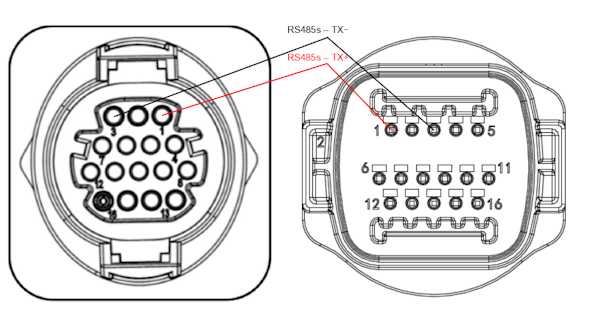
...TLX i TLM
Informacja
RS485 Wiring
- For correct RS485 wiring: Follow the guidelines for RS485 wiring.
- If the wiring shown in the table below is incorrect, please let us know.
- There is no general consensus in the industry about the usage of A and B for the RS485 polarity, so it may be counterintuitive and opposite of what you might expect for some devices.
| Device | SmartgridOne Controller model OM1 | SmartgridOne Controller model IG8 | RS485-USB converter | RS485-Ethernet converter |
|---|---|---|---|---|
| RS485s TR+ (pin 1) | RS485 A | RS485_POS | RS485 A | TX+ |
| RS485s TR- (pin 3) | RS485 B | RS485_NEG | RS485 B | TX- |
| N/A | RS GND | GND | Not available | G |
Konfiguracja
RS485
Ostrzeżenie
NOTE: RS485 Device Addresses
- You MUST give each device on the RS485 bus a unique address. Check the manual of the device on how to do this.
- Use lower addresses first (1, 2, ...) because the SmartgridOne Controller will find them faster!
- For each device, it is generally recommended to stick with the factory default baud rate, parity, and stop bits. The SmartgridOne Controller will scan on those first.
Zewnętrzna kontrola falownika musi być aktywowana w menu konfiguracji falownika za pomocą ekranu LCD.
- Krótko naciśnij przycisk w dół.
- Zobaczysz "1. Enter settings" (Wejdź w ustawienia), przytrzymaj przycisk w dół przez 2 sekundy, aby wejść do ustawień.
- Przejdź przez ustawienia, aż zobaczysz:
- Modbus Address (Adres Modbus) lub
- Set ComProtocol (Ustaw protokół komunikacji)
- Przytrzymaj przycisk w dół przez 2 sekundy, aby ustawić adres.
- Ustaw adres na pożądaną wartość.
Last updated March 11, 2026Edit this page