
SmartgridOne logo
SmartgridOne logo
Quick StartInstallationNetworkWiring & connectivity guidelinesApp
1. Link to your account2. Accessing commissioning interface3. Grid limits4. Location / address5. Add grid energy meter6. Add other devices7. Grouping devices
9. PV panel configuration10. External control signals
Adding a deviceAdvanced settingsBackupEnergy storage and EVsBattery maintenance chargeData usageDC-Linking Inverters and BatteriesDirect relay or switch controlEnergy CostsPhase imbalance correctionPredictionsPrioritiesRescale energy meter readingsFactory resetReverse energy meter readingsTesting and manual overrideUser managementConfiguring a fixed IP address in Windows
SpecificationsStatus LEDsControl response timeVideo tutorialsCertificatesLicenseSafety, maintenance and legal notices
Configuration from A to Z11 Extra Information
Tip

For the SmartgridOne Controller energy meters are installed 'in reverse' when they count export / production / discharging as a positive number, and import / consumption / charging as a negative number.

Warning

For stable functioning of the control system, it is important that the SmartgridOne Controller knows when an energy meter is installed in reverse.

You can indicate in the settings of the energy meter in the 'Devices tab' that an energy meter is installed in reverse.
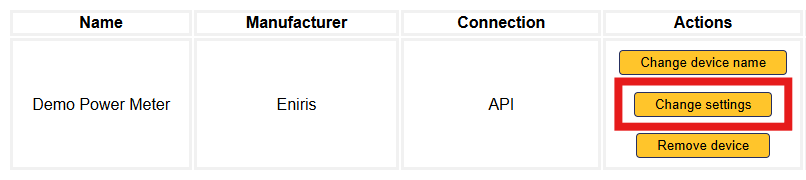
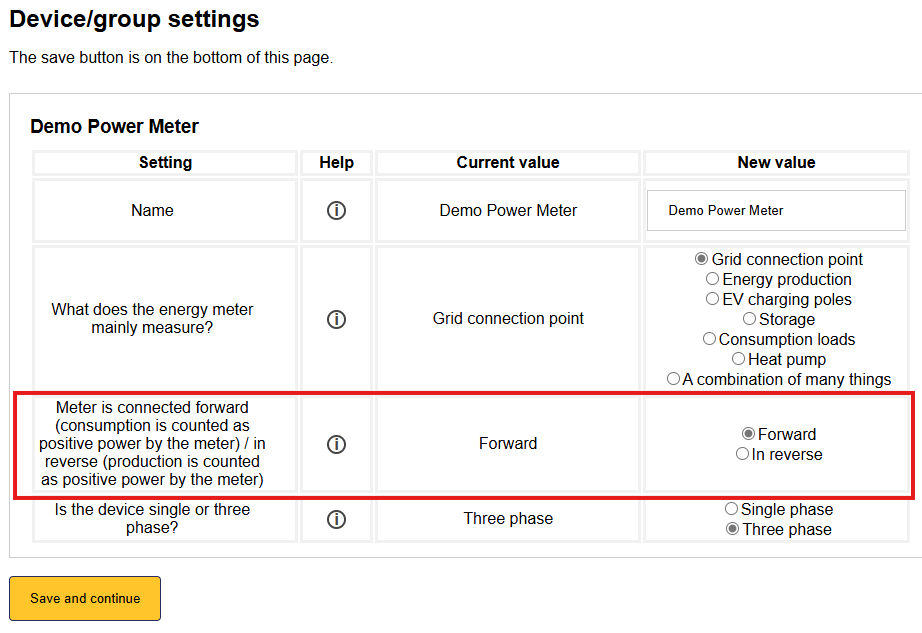
Image 1
Image 1

Factory reset

Previous Page

Testing and manual override

Next Page