
FCR
This guide will help you configure FCR on your SmartgridOne Controller to remotely control and monitor battery installations.
Before continuing, make sure your network and devices are ready by following the MQTT Setup guide.
Overview
Caution
NOTE: FCR overrides the original functionality of the controller.
Supported Devices
| Device Type | Variants | Supported |
|---|---|---|
| Solar Inverters | All | ❌ |
| Storage Devices | ✅ | |
| EV Chargers | ❌ |
Supported Countries
| Country | Supported |
|---|---|
| Belgium | ❌ |
| Netherlands | |
| Switzerland | ✅ |
Prerequisites
Note
Only specific installations can be set up via FCR. Please verify that the installation is certified.
1. Add the devices
Login to the commissioning interface and make sure the devices are added to the SmartgridOne Controller.
2. Check the grid power limits
In the settings, the grid power limits should be set correctly. Click Settings and check the highlighted setting in the image. If necessary, adjust the settings.
3. Check the address
Make sure the address is set correctly.
Warning
The integration may not work correctly if the address is not correct!
Enabling FCR
From the commissioning interface, go to the 'External Signals' tab.
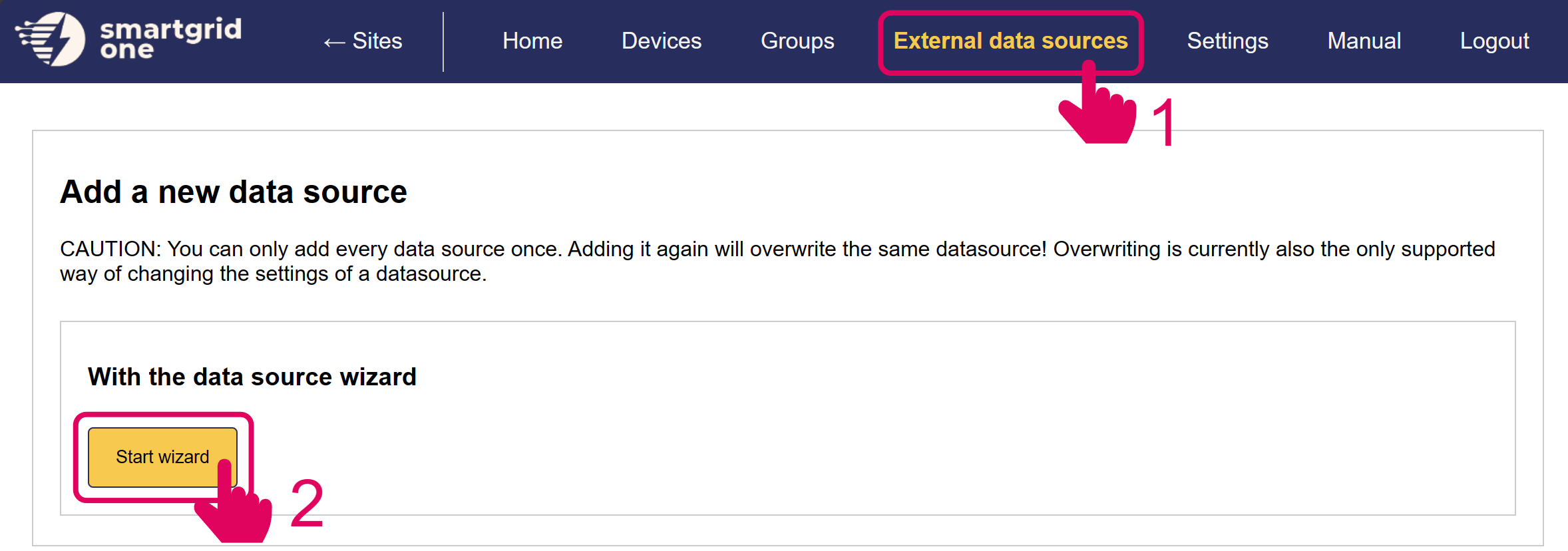
Click on 'Energy Markets'.
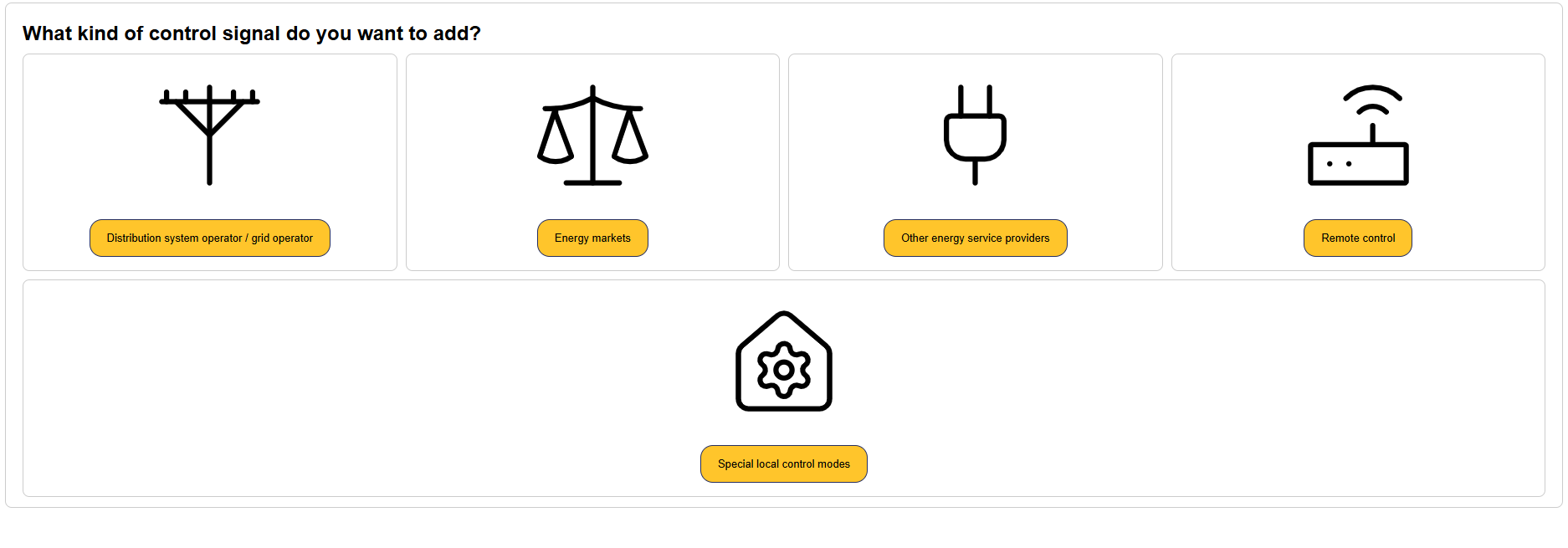
Select Eniris, select FCR and click 'Next'.
FCR operation
Frequency Containment Reserve (FCR) is the fastest automatic reserve used to keep the grid frequency close to its nominal value (50 Hz in Europe). The grid frequency is a direct measure of the balance between production and consumption: when consumption exceeds production the frequency drops below 50 Hz, and when production exceeds consumption it rises above 50 Hz. FCR reacts to these deviations within seconds to restore the balance.
As the EMS, the SmartgridOne Controller continuously measures the grid frequency locally and charges or discharges the battery based on the frequency, following a predefined droop curve:
- Frequency below 50 Hz (shortage of power on the grid): the battery discharges, injecting power to help raise the frequency back to nominal.
- Frequency above 50 Hz (surplus of power on the grid): the battery charges, absorbing power to help bring the frequency back down.
- Frequency at 50 Hz (balanced grid): the battery stays idle within the dead band.
The droop curve defines how much power the battery delivers for a given frequency deviation. A small deadband, usually 10mHz, around 50 Hz avoids reacting to tiny fluctuations, and the response scales linearly with the deviation up to the maximum reserve power at the edge of the operating band. In the European FCR market, full activation is reached at a deviation of ±200 mHz (i.e. at 49.8 Hz and 50.2 Hz).
Because the controller measures the frequency itself and applies the droop curve autonomously, the battery responds automatically and in real time to grid frequency changes — no external setpoint is required to activate the reserve.
The grid operator controls the participation via MQTT messages (specified below). These messages determine:
- Whether FCR is active or not — the grid operator enables or disables the reserve. When FCR is inactive, the controller does not respond to frequency deviations.
- The allocated capacity — the amount of reserve power the battery must provide. This allocated capacity can differ from the battery's nominal power (nompower); the droop curve is scaled to this allocated capacity rather than to the full nominal power of the battery.
FCR MQTT Messages
FCR is driven by MQTT messages sent to the SmartgridOne Controller. For everything related to connecting to the MQTT broker — network requirements and credentials — follow the Live MQTT Control guide first. FCR uses the same broker and connection, but its own dedicated topics described below.
MQTT Topics
FCR uses a separate set of topics from the standard remote control. Replace <Controller SN> with the serial number of the SmartgridOne Controller you intend to control.
| Topic | Direction | Purpose |
|---|---|---|
standard1/rp_one_s/remoteFCRMetrics/<Controller SN> | To the controller | Incoming topic — used to send the FCR command (the JSON message below). |
standard1/outbound/remoteFCRMetrics/ack/<Controller SN> | From the controller | Ack topic — the controller acknowledges here that the command has been received and saved. |
standard1/outbound/remoteFCRMetrics/feedback/<Controller SN> | From the controller | Feedback topic — the controller publishes feedback here every second. |
Message format
The FCR message has the following structure:
{
    "time": 1714652046,
    "extraTags": {
        "nodeId": "<Controller SN>_site_0"
    },
    "fields": {
        "fcr": {
            "active": true,
            "capacity_kW": 100.0,
            "start_time": 1714652046,
            "end_time": 1714655646
        },
        "management": {
            "setpoint_W": -5000.0,
            "start_time": 1714652046,
            "end_time": 1714655646
        },
        "test": {
            "mode": "frequency_injection",
            "ramp": {
                "f_start_Hz": 50.0,
                "f_target_Hz": 49.8,
                "duration_s": 30.0,
                "t_start": 1714652046
            }
        }
    }
}
Fields description
- time (Integer): Unix timestamp in seconds indicating when the message was sent.
- extraTags (Object):
- nodeId (String): Unique identifier of the site node. This is your serial number followed by
_site_0for most SmartgridOne Controller devices.
- nodeId (String): Unique identifier of the site node. This is your serial number followed by
- fields (Object): Contains the FCR instruction, split into the
fcr,managementandtestblocks below. Each block is optional; only include the ones that apply.
fcr
Defines the actual FCR participation. This is the main block that determines whether the reserve is active and how the droop curve is scaled.
- active (Boolean): Whether FCR is active. When
true, the controller responds to frequency deviations following the droop curve. Whenfalse, FCR is disabled and the controller does not react to the grid frequency. - capacity_kW (Float): The allocated reserve capacity, in kilowatts, that the battery must provide. The droop curve is scaled to this value. As noted above, this can differ from the battery's nominal power (nompower).
- start_time (Integer): Unix timestamp in seconds at which this FCR instruction becomes active.
- end_time (Integer): Unix timestamp in seconds at which this FCR instruction expires.
management
Applies an explicit power setpoint on top of, or in place of, the FCR response — for example to steer the battery's state of charge back into a workable range while participating in FCR.
- setpoint_W (Float): Desired power setpoint in watts. A positive value charges the battery, a negative value discharges it.
- start_time (Integer): Unix timestamp in seconds at which the management setpoint becomes active.
- end_time (Integer): Unix timestamp in seconds at which the management setpoint expires.
test
Used to run a qualification or verification test on the installation. Only include this block when performing a test.
- mode (String): The test to perform. One of:
"frequency_injection": Simulate a frequency deviation by ramping the frequency signal, to verify the droop response. Requires therampobject below."usable_energy": Verify the usable energy of the battery.
- ramp (Object): Only used when
modeis"frequency_injection". Describes the simulated frequency ramp:- f_start_Hz (Float): Frequency at the start of the ramp, in hertz.
- f_target_Hz (Float): Frequency to ramp towards, in hertz.
- duration_s (Float): Duration of the ramp, in seconds.
- t_start (Integer): Unix timestamp in seconds at which the ramp starts.
- target_soc (Float): Only used when
modeis"usable_energy". The target state of charge, as a value from 20 to 100, that the battery should reach during the usable-energy test. The controller charges or discharges the battery towards this state of charge, measuring the energy transferred to verify the battery's usable energy.
Acknowledgement message
After a command is received on the incoming topic, the SmartgridOne Controller publishes an acknowledgement on the ack topic. The acknowledgement reports whether the command was accepted and saved, or rejected. It comes in one of the following two formats.
When the command received:
{
    "requestTime": "<Unix Timestamp>",
    "time": "<Unix Timestamp>",
    "siteNodeId": "<Controller SN>_site_0",
    "data": {
        "status": "accepted" or "rejected",
        "error": "<error message>"
    },
    "fields": {}
}
Fields description
- requestTime (Integer): Unix timestamp in seconds of the original command being acknowledged. This matches the
timefield of the command that was sent, allowing you to correlate the acknowledgement with the request. - time (Integer): Unix timestamp in seconds at which the acknowledgement was sent.
- siteNodeId (String): The
nodeIdof the site sending the acknowledgement. - data (Object):
- status (String): Either
"accepted"when the command was received and saved, or"rejected"when it could not be applied. - error (String): Only present when
statusis"rejected". Describes why the command was rejected.
- status (String): Either
- fields (Object): Empty object.
Feedback message
While FCR is running, the SmartgridOne Controller publishes a feedback message on the feedback topic every second. This lets you monitor the live state of the installation and the FCR response in real time.
{
    "time": "<Unix Timestamp>",
    "siteNodeId": "<Controller SN>_site_0",
    "data": {
        "fcr_active": <bool>,
        "frequency_Hz": <float>,
        "actualPowerTot_W": <float>,
        "setpoint_W": <float>,
        "fcrSetpoint_W": <float>,
        "managementSetpoint_W": <float>,
        "min_soc_perc": <float>,
        "max_soc_perc": <float>,
        "soc_perc": <float>,
        "droop_perc": <float>
    }
}
Fields description
- time (Integer): Unix timestamp in seconds at which the feedback message was sent.
- siteNodeId (String): The
nodeIdof the site sending the feedback. - data (Object):
- fcr_active (Boolean): Whether FCR is currently active.
- frequency_Hz (Float): The local grid frequency measured by the controller, in hertz.
- actualPowerTot_W (Float): The actual active power of the battery, in watts. A positive value indicates charging, a negative value discharging.
- setpoint_W (Float): The current total power setpoint, in watts. This is the sum of
fcrSetpoint_WandmanagementSetpoint_Wbelow. A positive value charges the battery, a negative value discharges it. - fcrSetpoint_W (Float): The FCR contribution to the power setpoint, in watts. This is the part of the setpoint resulting from the frequency deviation and the droop curve.
- managementSetpoint_W (Float): The management contribution to the power setpoint, in watts. This is the part of the setpoint coming from the
managementcharge/discharge signal, applied on top of the FCR response. - min_soc_perc (Float): The minimum allowed state of charge, as a percentage. Below this level the battery stops discharging to keep enough energy in reserve for FCR.
- max_soc_perc (Float): The maximum allowed state of charge, as a percentage. Above this level the battery stops charging to keep enough headroom in reserve for FCR.
- soc_perc (Float): The mean state of charge of the battery, as a percentage.
- droop_perc (Float): The active droop, as a percentage — the share of the allocated FCR capacity currently being delivered in response to the frequency deviation.