
TODO: Sembra che questo sia valido per più inverter?

Inverter Sofar delle serie TL-G3 e TLM/X-G3
Dispositivi supportati
| Device Type | Modbus TCP (Ethernet) | RS485 | Curtailment |
|---|---|---|---|
| ... | ✅ | ✅ | ✅ |
| 1100-3300TL-G3 | |||
| 3000-7500TLM | |||
| 10000-40000TL | |||
| 5000-80000TLX-G3 | |||
| 100000-125000TLX-G4 | |||
| 7000-10500TLM-G3 |
Avviso
Avviso
- La maggior parte dei dispositivi può comunicare tramite Modbus TCP. Questo non è valido per la serie "SOFAR 1...40KTL"
- Alcuni inverter richiedono firmware specifici, disponibili solo tramite determinati distributori. In caso di dubbi, consultare il proprio distributore.
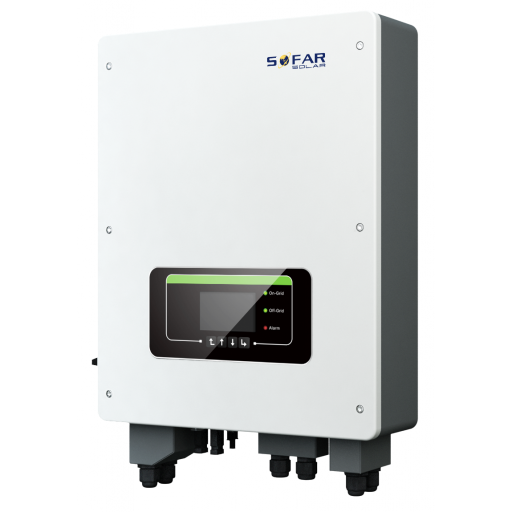
Cablaggio
Ethernet
Collegare l’inverter alla rete Internet utilizzando la "SOFAR SOLAR ETHERNET STICK LSE3".
Per un cablaggio Ethernet corretto: seguire le linee guida per il cablaggio Ethernet.
RS485
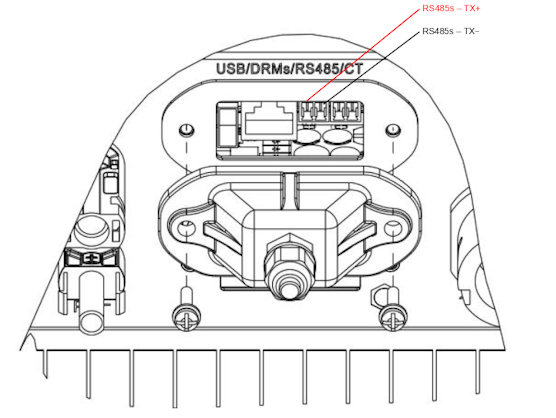
...TL-G3 & G1 & G2
Info
RS485 Wiring
- For correct RS485 wiring: Follow the guidelines for RS485 wiring.
- If the wiring shown in the table below is incorrect, please let us know.
- There is no general consensus in the industry about the usage of A and B for the RS485 polarity, so it may be counterintuitive and opposite of what you might expect for some devices.
| Device | SmartgridOne Controller model OM1 | SmartgridOne Controller model IG8 | RS485-USB converter | RS485-Ethernet converter |
|---|---|---|---|---|
| RS485s TR+ | RS485 A | RS485_POS | RS485 A | TX+ |
| RS485s TR- | RS485 B | RS485_NEG | RS485 B | TX- |
| N/A | RS GND | GND | Not available | G |
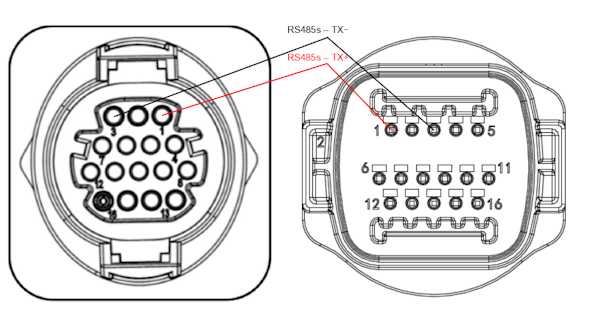
...TLX & TLM
Info
RS485 Wiring
- For correct RS485 wiring: Follow the guidelines for RS485 wiring.
- If the wiring shown in the table below is incorrect, please let us know.
- There is no general consensus in the industry about the usage of A and B for the RS485 polarity, so it may be counterintuitive and opposite of what you might expect for some devices.
| Device | SmartgridOne Controller model OM1 | SmartgridOne Controller model IG8 | RS485-USB converter | RS485-Ethernet converter |
|---|---|---|---|---|
| RS485s TR+ (pin 1) | RS485 A | RS485_POS | RS485 A | TX+ |
| RS485s TR- (pin 3) | RS485 B | RS485_NEG | RS485 B | TX- |
| N/A | RS GND | GND | Not available | G |
Configurazione
RS485
Avviso
NOTE: RS485 Device Addresses
- You MUST give each device on the RS485 bus a unique address. Check the manual of the device on how to do this.
- Use lower addresses first (1, 2, ...) because the SmartgridOne Controller will find them faster!
- For each device, it is generally recommended to stick with the factory default baud rate, parity, and stop bits. The SmartgridOne Controller will scan on those first.
Il controllo esterno dell'inverter deve essere attivato nel menu di configurazione dell'inverter tramite lo schermo LCD.
- Premere brevemente il pulsante giù.
- Verrà visualizzato "1. Accedi alle impostazioni"; premere il pulsante giù per 2 secondi per accedere alle impostazioni.
- Scorrere le impostazioni fino a visualizzare:
- Indirizzo Modbus oppure
- Imposta ComProtocol
- Premere il pulsante giù per 2 secondi per impostare l'indirizzo.
- Impostare l'indirizzo sul valore desiderato.
Last updated August 17, 2026Edit this page