SmartgridOne logo
SmartgridOne logo
Quick StartInstallationNetworkWiring & connectivity guidelinesApp
OverviewNew integrations
a-TroniXABB, FIMERADS-TecAforeAlphaESSAmpowrAngileAnklous PV, Hybrid and Battery InvertersAPsystemsAteps BatteryBeauventC-BatteryCellpowerChisageDanfossDeltaDET Power PV, Hybrid and Battery InvertersDEYEDiehl-AkoDMEGC InvertersDynessDysun EnergyEcosourcenEenovanceElecnovaEnbrilionEnergreenEnerlutionEnjoyPowersEnphaseEP EquipmentESY InvertersFortonaFraxFroniusGoodWeGotionGreener / AlfenHiteHithiumHypontechiWellJinkoKacoKehuaKostalMarstekMastervoltMidTeQMotomaOctave EnergyOmniPowerPixiiPower-SonicPoweroadPylontechRefurbRegitecRenonRitarSAJSchneider SunEzySchucoSCUSessySigenergySinexcelSocomecSolarlogSolarMaxSolarwattSolaxSolintegSolplanetSunwaytechSunwodaSus-PowerTeclomanTeploreTesvoltVaconVictronVolstoraWattsNextXantrexZeversolar
Autarco
Solis
SpecificationsStatus LEDsControl response timeVideo tutorialsCertificatesLicenseSafety, maintenance and legal notices
DevicesPV hybrid and battery inverters
logo

Fronius

Supported Devices

Device TypeModbus TCP (Ethernet)RS485Curtailment
GEN24✅✅✅
GEN24 Plus
Symo
Primo
Tauro
Eco
Agilo

Wiring

For correct ethernet wiring: Follow the the guidelines for ethernet wiring.

Configuration

1. Modbus TCP must be enabled.

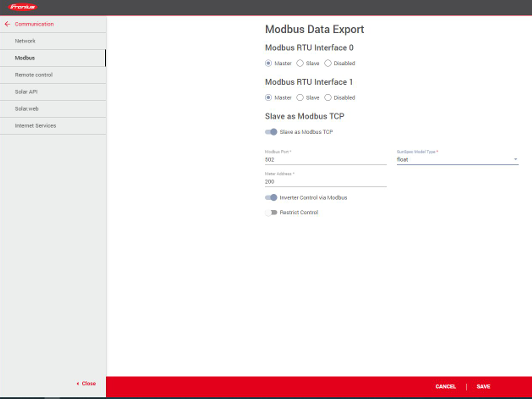
Activate Modbus TCP/IP in the inverter's interface: see the link below for instructions on how to connect to the inverter. https://www.youtube.com/watch?v=T25omrhcroU

  1. Select the menu Communication > Modbus
  2. Activate Slave as Modbus TCP
  3. Choose SunSpec Model Type "Float"
  4. Enable Inverter Control via Modbus
  5. Save your settings by clicking Save
Image

Frax

Previous Page

GoodWe

Next Page

On this page

FroniusSupported DevicesWiringConfiguration1. Modbus TCP must be enabled.