
SmartgridOne logo
SmartgridOne logo
Quick StartInstallationNetworkWiring & connectivity guidelinesApp
OverviewNew integrations
a-TroniXABB, FIMERADS-TecAforeAlphaESSAmpowrAngileAnklous PV, Hybrid and Battery InvertersAPsystemsAteps BatteryBeauventC-BatteryCellpowerChisageDanfossDeltaDET Power PV, Hybrid and Battery InvertersDEYEDiehl-AkoDMEGC InvertersDynessDysun EnergyEcosourcenEenovanceElecnovaEnbrilionEnergreenEnerlutionEnjoyPowersEnphaseEP EquipmentESY InvertersFortonaFraxFroniusGoodWeGotionGreener / AlfenHiteHithiumHypontechiWellJinkoKacoKehuaKostalMarstekMastervoltMidTeQMotomaOctave EnergyOmniPowerPixiiPower-SonicPoweroadPylontechRefurbRegitecRenonRitarSAJSchneider SunEzySchucoSCUSessySigenergySinexcelSocomecSolarlogSolarMaxSolarwattSolaxSolintegSolplanetSunwaytechSunwodaSus-PowerTeclomanTeploreTesvoltVaconVictronVolstoraWattsNextXantrexZeversolar
Autarco
Solis
SpecificationsStatus LEDsControl response timeVideo tutorialsCertificatesLicenseSafety, maintenance and legal notices
DevicesPV hybrid and battery inverters
logo

Delta Inverters

Supported Devices

Device TypeVariantsModbus TCP (Ethernet)RS485Curtailment
Delta RPI M6/M8/M10/M12/M15A/M20A/M30❌✅✅
H3/H5/H3A/H4A/H5A (not tested)
M6A/M8A/M10A/M50A/M30A (not tested)

Wiring

The SmartgridOne Controller and the Delta inverters communicate via RS485.

RS485
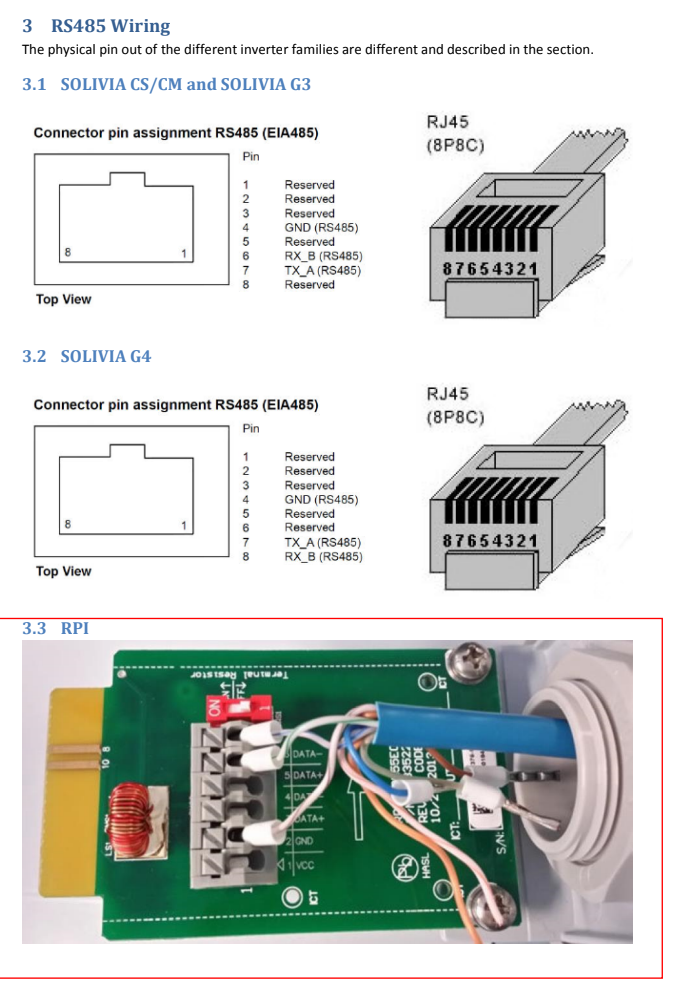
Delta Wiring
Settingoptions
Baudrate2400 / 4800 / 9600 / 19200 (default) / 38400
Data bits8
ParityNone
Stop bits1

Configuration

NOTE: RS485 Device Addresses
  • You MUST give each device on the RS485 bus a unique address. Check the manual of the device on how to do this.
  • Use lower addresses first (1, 2, ...) because the SmartgridOne Controller will find them faster!
  • For each device, it is generally recommended to stick with the factory default baud rate, parity, and stop bits. The SmartgridOne Controller will scan on those first.

Danfoss

Previous Page

DET Power PV, Hybrid and Battery Inverters

Next Page

On this page

Delta InvertersSupported DevicesWiringRS485Configuration